
Charles Proxy on iPhone: alternatives that don't need a Mac
By Ryan · Published 2026-07-27
Charles Proxy has had an iPhone app since March 2018, and most people looking for one have never heard of it. It captures and decrypts on the device with no computer involved, and it does not do the four things people open desktop Charles for: rewrite, breakpoints, Map Local, and throttling. So "which app is Charles for iPhone" turns out to be the wrong question. The right one is what you're actually doing on a phone — and on a phone, the job is almost always seeing, not changing.
What you actually use Charles for, and which parts fit on a phone
Desktop Charles does six distinct jobs, and only the first is "see the traffic":
- Capture and decrypt HTTP/HTTPS.
- Rewrite — change a header or body automatically, by rule.
- Breakpoints — pause a request in flight and edit it by hand.
- Map Local and Map Remote — serve a file from disk, or a different host, in place of a real response.
- Throttling — simulate a slow or lossy network.
- Repeat — replay a captured request, possibly modified.
Jobs two through six are things you do to your own app, at your desk, with the source code open. If that's the situation, you have a Mac already and you should use it.
The reason to reach for the phone is the opposite situation: the traffic only exists there. It's cellular. It's an app you didn't write. It's happening in a parking lot, or in the ten seconds after a push notification lands. Nothing about iOS prevents any of the six jobs, but the one that justifies a phone-shaped tool is the first one — and the five apps below are very different at it.
Charles for iOS is a field recorder, not a port
Charles Proxy for iOS has six features: SSL proxying, viewing and sharing request and response bodies, syntax highlighting, network performance measurement over Wi-Fi or cellular, blocking requests to nominated hosts, and DNS spoofing.
Nothing on that list changes a response.
The app is version 1.6, first released 2018-03-27 and last updated 2026-03-25, sold by XK72 Limited for $8.99, requiring iOS 15.6 or later. XK72's own iOS documentation is candid about the gap: "We plan to bring more of the features that you know and love from Charles on the desktop to the iOS version over the coming months."
Where it wins is the handoff. Charles for iOS can transfer a recorded session to desktop Charles, and version 1.6 added selecting multiple hosts or requests to save or export. If you already own the desktop licence, it's best understood as a field recorder: capture on the phone, open the session on the big screen, use the real tool. Bought for that job it's good value. Bought as a replacement for the desktop app it will disappoint you within an hour.
The five on-device options, compared
Every app below runs entirely on the iPhone, decrypts HTTPS with a root certificate you install yourself, and needs no jailbreak and no Mac. They're all HTTP(S) inspectors built on the same two iOS APIs — the on-device inspection explainer walks the data path from the CONNECT line to the leaf certificate.
Tracer
- Price: free, with premium features as a subscription or one-time purchase.
- Best at: attribution. It names the company, SDK, cloud region and CDN edge behind every request instead of showing you a hostname and wishing you luck. If the app you want to inspect isn't one you wrote, this is the one to install.
- Not always on: the VPN is scoped to a capture session, enabled when you start one and torn down when you stop. It doesn't sit in your status bar all day, and it doesn't touch battery life or app behavior between captures.
- Decrypts everything by default — no allowlist of domains to maintain before you see anything.
- Export: URL, cURL, or HAR 1.2, per request. Requires iOS 26.
Charles Proxy for iOS
- Price: $8.99 up front, no in-app purchases.
- Modifies traffic: no rewrite, no breakpoints, no Map Local. Blocks nominated hosts and spoofs DNS.
- Export: share bodies; save or export selected hosts and requests; transfer a whole session to desktop Charles.
- Best at: recording in the field for later analysis on a Mac.
Proxyman for iOS
- Price: free to download; Premium is an in-app purchase, listed at $8.99/month, $49.99/year or $99.99 lifetime.
- Modifies traffic: yes — the listing names SSL proxying, Block List, Map Local and Breakpoint, plus a compose tool for hand-built requests.
- Export: shares traffic to Proxyman for macOS.
- Best at: editing your own app's responses without a desk.
Storm Sniffer
- Price: free to download, in-app purchases from $1.99 to $24.99.
- Modifies traffic: yes — rewrite with URL redirection and custom headers, local and remote file mocking, replay with cron scheduling, JavaScript scripting.
- Export: HAR.
- Best at: old hardware — it runs back to iOS 10 — and scripted rules.
Stream HTTP Sniffer
- Price: free to download; VIP in-app purchases listed from $2.99/month to $12.99 lifetime.
- Modifies traffic: yes — regex rewrite, URL blocking, JavaScript scripting.
- Export: not claimed on the listing.
- Best at: cheap lifetime pricing.
Sort those by the six jobs and the choice is clean. If you're debugging your own app and need to force a different response, you want a rules engine — Proxyman for iOS is the only one of the five with breakpoints. For everything else, which is to say for the actual reason anyone inspects traffic on a phone, you want to understand what you're looking at, and that's the part the other four leave to you.
Whichever you pick, the setup is the same three steps: how to inspect HTTPS traffic on iPhone without a Mac walks through the certificate, the trust toggle and what a capture changes about your connections.
Seeing the request is the easy half
A proxy answers "what did this request contain". It does not answer "who is that", and on a phone that second question is usually the whole reason you started capturing. A list of forty hostnames is not an answer; it's homework.
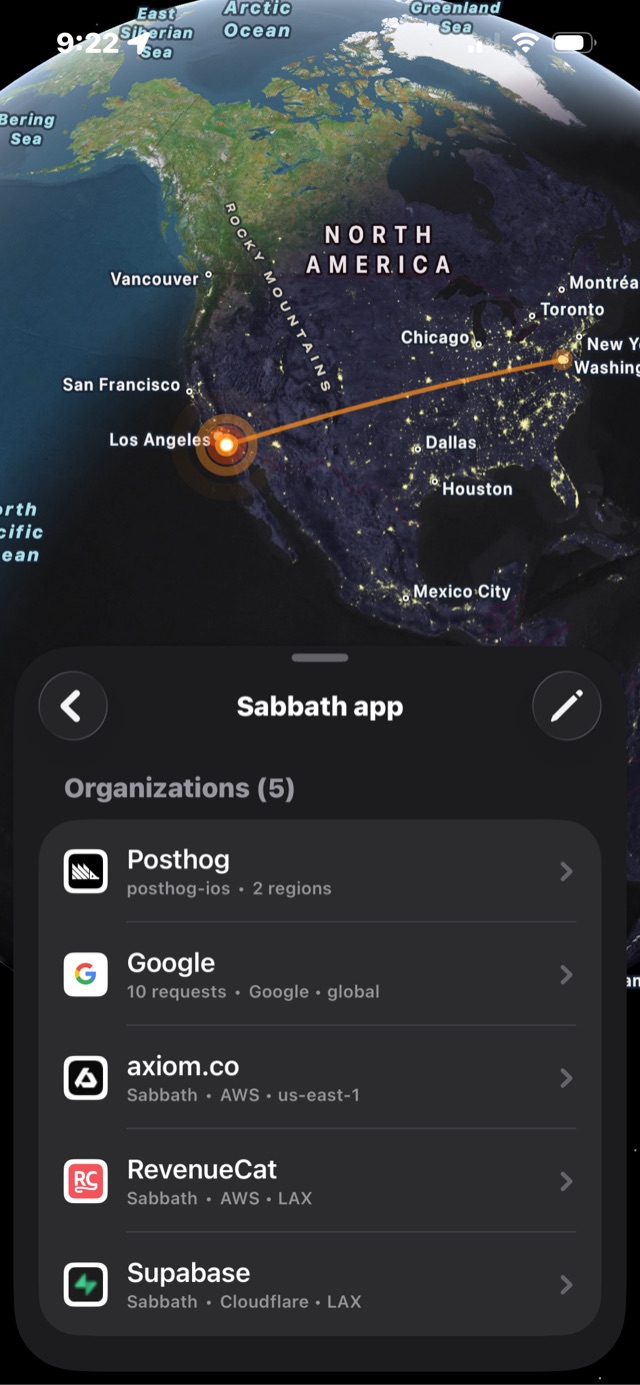
That's Tracer, and each attribution comes from a specific, checkable mechanism rather than a guess:
-
Organization — the hostname is matched against 424
organizations and 1,091 host patterns bundled in the app, so
us.i.posthog.comresolves to PostHog rather than to an IP address. -
SDK — the first token of the
User-Agentheader.posthog-ios/…becomes "posthog-ios", which is how you tell an analytics SDK's traffic from the app's own API calls. -
Cloud region — the resolved IP looked up against a
datacenter database, giving
AWS · us-east-1rather than a city. -
CDN edge — the IATA airport code parsed out of
whichever CDN header is present:
cf-ray(Cloudflare),x-amz-cf-pop(CloudFront),x-served-by(Fastly), orx-vercel-id(Vercel). Acf-rayending in-LAXmeans the response came out of Los Angeles.
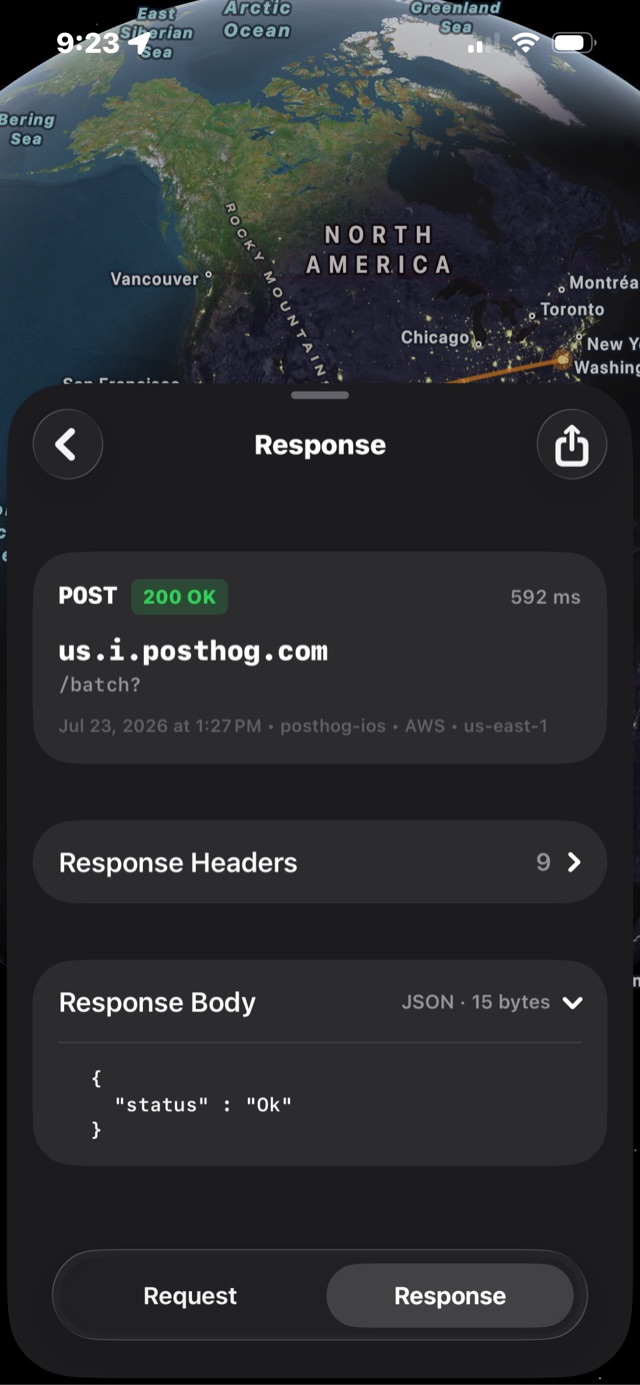
POST us.i.posthog.com/batch, 200 OK in 592 ms,
{"status":"Ok"}. The grey line carries the attribution —
posthog-ios, AWS, us-east-1.
One more thing worth knowing before you trust any of these apps with your traffic, since all five ask you to install a root certificate. Tracer generates its CA key inside the Secure Enclave, marked non-exportable and available only after first unlock, and mints per-host leaf certificates with a seven-day validity. The key that signs your traffic cannot leave the phone — not to a server, and not to the app that created it.
Where a Mac still wins
For anything below HTTP, tether the phone. Apple ships
rvictl, which attaches a
remote virtual interface
to a connected iPhone so Wireshark or tcpdump can record
every packet the device sends, QUIC and all. Nothing on the App Store
can do that, and nothing ever will — reading arbitrary packets from
other processes is exactly what the sandbox exists to prevent.
The desktop also still wins for reading four hundred JSON responses at once, for scripted interception with mitmproxy's Python addons, for throttling and Map Remote, and for captures that run for a week and write to a filesystem.
The phone wins on the axis the desktop can't reach at all: cellular traffic, other people's apps, captures taken away from your desk, and setup measured in a minute.
FAQ
Does Charles Proxy work on iPhone without a Mac?
Yes, but not the app you're picturing. XK72 ships Charles Proxy for iOS, a separate $8.99 App Store app that captures and decrypts traffic on the phone with no computer involved. Its feature list covers SSL proxying, viewing and sharing bodies, syntax highlighting, network performance measurement, blocking nominated hosts, and DNS spoofing. Rewrite, breakpoints, Map Local and throttling are desktop-only.
Is there a free Charles Proxy alternative for iOS?
Tracer, Proxyman for iOS, Storm Sniffer and Stream HTTP Sniffer are all free to download and charge through in-app purchases. Charles Proxy for iOS is the only one of the five that costs money up front, at $8.99. Checked on the US App Store on 2026-07-27.
Can I inspect HTTPS traffic on an iPhone without jailbreaking?
Yes. Every on-device inspector on the App Store uses two public iOS APIs: NetworkExtension to route traffic through the app, and a user-installed root certificate to decrypt TLS. No jailbreak is involved, and installing the certificate requires your explicit consent in Settings.
Which iPhone app shows what company an app is sending data to?
Tracer. The other four on-device inspectors show you the hostname and
leave the identification to you. Tracer matches each hostname against
424 organizations and 1,091 host patterns bundled in the app, reads
the SDK from the User-Agent header, resolves the IP to a
cloud provider and region, and parses the CDN edge out of headers like
cf-ray and x-amz-cf-pop.
Why does an app stop working when I run a capture?
That app almost certainly uses certificate pinning: it accepts only its own server's certificate, so it rejects the one your inspector presents and shows an error. This affects every inspection proxy equally, on the phone or on a Mac. Pinning does not hide traffic — requests the app does send are still captured and decrypted. It just means the app may misbehave until you end the capture.
Pick by the job, not by the brand. If the traffic isn't HTTP, tether the
phone and run Wireshark over rvictl. If you need to edit
your own app's responses from a phone, Proxyman for iOS has the
breakpoints. And if the question is the one that actually sent you
looking for Charles on an iPhone — what is this app sending, and who is
it sending it to — that's what I built
Tracer
for. It's free, the setup takes about a minute, and the
setup guide is here.