

How to export a HAR file from your iPhone
By Ryan · Published 2026-07-28
You can produce a standard HAR file on an iPhone with no Mac and no computer of any kind: capture the request with an on-device inspector, open it, and share it. In Tracer that's the share button on the request screen, then Share HAR…, which writes a HAR 1.2 file and hands it to the iOS share sheet — AirDrop, Files, Mail, or straight into a support ticket. What nobody mentions is the other half of the job. The single-request file I exported while writing this was 19,657 bytes, and it had a live analytics API key sitting in the middle of it.
The export itself is three taps
Exporting a HAR from an iPhone means capturing the request on the device and sharing the resulting file — there is no import, upload or pairing step. In Tracer:
- Start a capture and use the app you want to record. Requests appear as they happen. (Setup — certificate, trust, VPN permission — is a one-time minute, covered in the HTTPS inspection guide.)
- Tap the request you want, which opens the request/response detail screen.
- Tap the share button in the top-right corner and choose Share HAR…
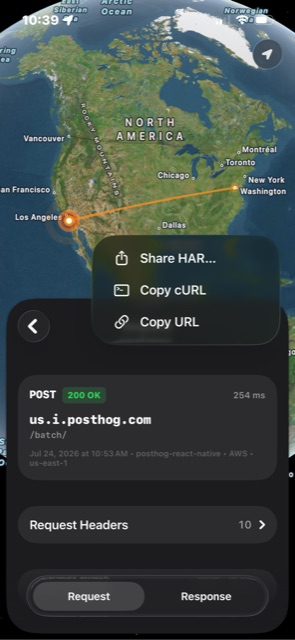
The file is named after the host and the local exchange ID —
us.i.posthog.com-406.har for the request below. From the
share sheet, "Save to Files" gives you something you can attach to a
ticket later; AirDrop puts it straight on a Mac's Downloads folder.
What a HAR file is, and why someone asked you for one
A HAR (HTTP Archive) file is a JSON document that records HTTP exchanges — method, URL, every request and response header, both bodies, status code and timings — in a format defined by the HAR 1.2 specification. Browsers, proxies and API tools all read and write it, which is why vendor support teams ask for one: it is the closest thing to a reproducible recording of what your device sent and what their server said back.
The awkward part is that the instructions those support pages link to assume a desktop browser. If the misbehaving thing is an iPhone app, Chrome DevTools can't see it at all, and the vendor's "open DevTools and press record" walkthrough is useless.
What was actually in the file
A Tracer HAR export contains exactly one entry: the request you shared.
The file below came from a POST to us.i.posthog.com/batch/
made by a third-party app on an iPhone 13 Pro running iOS 26.5.2,
captured 2026-07-24. It validates clean against
har-schema 2.0.0
— the published JSON Schema for HAR 1.2 — with zero errors, checked with
ajv on 2026-07-28.
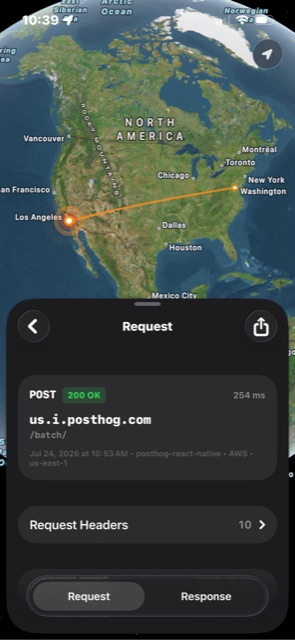
time and
timings.wait in the HAR; posthog-react-native
is read from the User-Agent, and the 10 headers listed here are the 10
in the file.
Keys come out alphabetically sorted. Truncated, with the credentials removed:
{
  "log": {
    "creator": { "name": "Tracer", "version": "1.0" },
    "entries": [
      {
        "cache": {},
        "request": {
          "bodySize": 14640,
          "cookies": [],
          "headers": [
            { "name": "Host", "value": "us.i.posthog.com" },
            { "name": "Content-Type", "value": "application/json" },
            { "name": "baggage", "value": "sentry-environment=production,sentry-release=5.7.0,sentry-public_key=[REDACTED],sentry-trace_id=[REDACTED],sentry-org_id=[REDACTED]" },
            { "name": "User-Agent", "value": "posthog-react-native/4.45.5" },
            { "name": "sentry-trace", "value": "[REDACTED]" }
          ],
          "headersSize": 508,
          "httpVersion": "HTTP/1.1",
          "method": "POST",
          "postData": {
            "mimeType": "application/json",
            "text": "{\"api_key\":\"phc_[REDACTED]\",\"batch\":[ … 8 events … ],\"sent_at\":\"2026-07-24T17:53:48.721Z\"}"
          },
          "queryString": [],
          "url": "https://us.i.posthog.com/batch/"
        },
        "response": {
          "bodySize": 15,
          "content": { "mimeType": "application/json", "size": 15, "text": "{\"status\":\"Ok\"}" },
          "headers": [
            { "name": "server", "value": "envoy" },
            { "name": "x-envoy-upstream-service-time", "value": "22" },
            { "name": "Connection", "value": "close" }
          ],
          "headersSize": 358,
          "httpVersion": "HTTP/1.1",
          "redirectURL": "",
          "status": 200,
          "statusText": "OK"
        },
        "startedDateTime": "2026-07-24T17:53:48.742Z",
        "time": 254.00006771087646,
        "timings": { "send": 0, "wait": 254.00006771087646, "receive": 0 }
      }
    ],
    "version": "1.2"
  }
}
That 14,640-byte request body held eight analytics events, five of them
$feature_flag_called, and the first event alone carried 41
properties: device model, OS version, locale, timezone, screen
dimensions, app version, build number and bundle identifier, a
distinct_id, a $session_id, and the names and
current values of 13 feature flags. Twelve distinct UUIDs appear across
the file. The guide on
what data apps send about you
goes through that same payload field by field.
Read the file before you send it
A HAR stores headers and bodies verbatim, so anything the app sent is in
the file — Authorization headers, session cookies, bearer
tokens, and credentials inside JSON bodies. This is not a quirk of any
one tool; it is what the format is for, and it's why
Chrome's own HAR export
carries the same warning.
The usual advice is to scrub the sensitive headers. With jq:
jq 'walk(if type == "object" and has("name") and has("value")
        and ((.name | ascii_downcase) as $n
             | ["authorization","cookie","set-cookie","x-api-key","baggage","sentry-trace"]
             | index($n))
      then .value = "[REDACTED]" else . end)' in.har > clean.har
That walks request headers, response headers, cookies and query
parameters in one pass, and the result still validates as HAR 1.2. Run
it on the file above and it redacts the Sentry keys in
baggage and sentry-trace.
It does not touch the thing that actually mattered.
The PostHog project API key was in postData.text, not in a
header — a 48-character phc_… string in the JSON body,
which is where that SDK puts it. Header scrubbing is the step everyone
knows about and it would have shipped the credential anyway. So read the
body too:
jq -r '.log.entries[].request.postData.text' file.har | jq .
For that reason I'm not naming the app this capture came from, and the key is redacted everywhere above: it's live, and it belongs to someone who didn't publish it. The general rule is short — open the file, read both bodies, and only then attach it to a ticket. A HAR is a transcript, not a screenshot.
Where to open a HAR file
Any HAR 1.2 file from a phone opens in the same desktop tools that read a browser's HAR. The ones worth knowing:
- Chrome DevTools — open the Network panel and drag the file onto the requests table, or use the import (↑) button in the toolbar. Best for a quick look at headers and bodies with no install.
- Charles Proxy — imports HAR from the File menu, and has since Charles 3.6. Puts phone traffic next to whatever you captured on the desktop.
-
Proxyman — File → Open, which
reads HAR 1.2
alongside its own logs and Charles
.chlsfiles. - Postman — Import → File, which converts a HAR into a collection (v9.6 and later). This is the one to use if the goal is replaying the request against the same API.
- Google's HAR Analyzer — toolbox.googleapps.com/apps/har_analyzer, which parses in the browser and is the easiest thing to send a non-technical colleague.
-
jq — it's JSON.
jq '.log.entries[].request.url'
          file.har
beats any GUI for answering one specific question.
Merging several requests into one archive
Tracer exports one exchange per file, so a vendor asking for "a HAR of
the whole flow" needs one more step: export the requests you want, then
concatenate the entries arrays.
jq -s '{log: {version: "1.2", creator: .[0].log.creator,
        entries: [.[].log.entries[]] | sort_by(.startedDateTime)}}' *.har > session.har
I ran that over two exported files on 2026-07-28; the merged archive validates against har-schema 2.0.0 and imports normally. The comparison of the five on-device inspectors covers who exports what.
Three things a capture changes about the numbers in the file
A HAR recorded through any interception proxy describes the proxied connection, not the connection the app would have made unobserved. Three differences show up in the exported file, all checkable in the excerpt above:
-
httpVersionis always HTTP/1.1. Tracer advertises onlyhttp/1.1in ALPN in both directions, so hosts that would negotiate HTTP/2 don't. The response'sConnection: closeis the other half of that: every forwarded request goes upstream on a fresh connection. -
All the time is in
wait. The export writessend: 0,receive: 0and the full duration inwait, and each duration includes a fresh TCP and TLS handshake — read them as relative, and don't benchmark through a capture. -
Compressed bodies are stored decoded, but the sizes are wire
bytes.
Tracer inflates gzip, deflate and brotli before storing, so
content.textis the readable body whilecontent.sizeis the compressed byte count. Compare againstContent-Lengthin the headers.
And a HAR can only contain what a proxy could decrypt. A host the app
pins exports as a hostname and byte counts with no plaintext, and
anything below HTTP — a failed handshake, a DNS lookup, a QUIC stream —
isn't representable in the format at all. That's a packet capture,
which means rvictl and Wireshark on a tethered iPhone.
FAQ
Can you create a HAR file on an iPhone without a Mac?
Yes. An on-device inspector captures the request on the phone and writes a HAR 1.2 file that the iOS share sheet can AirDrop, save to Files, or attach to an email. No computer is involved at any point. The alternative paths — Safari Web Inspector, or a desktop proxy like Charles or mitmproxy — all need a computer attached to the phone or on the same network.
Does Safari on iPhone export HAR files?
Not on its own. Safari's Web Inspector can export a HAR from the Network tab, but the inspector runs on a Mac connected to the iPhone over USB, and it only sees traffic from Safari and WebKit web views — not traffic from other apps.
Do HAR files contain passwords and API keys?
They can. A HAR stores request and response headers and bodies
verbatim, which means Authorization headers, session
cookies, bearer tokens and any credential in a JSON body are all in
the file. A single-request HAR exported for this article was 19,657
bytes and contained a live PostHog project API key, a Sentry public
key, two user identifiers and 13 feature flag names.
How do I merge multiple HAR files into one?
Concatenate the entries arrays. With jq:
jq -s '{log: {version: "1.2", creator: .[0].log.creator, entries:
          [.[].log.entries[]] | sort_by(.startedDateTime)}}' *.har >
          session.har
. The result is a valid HAR 1.2 archive that imports
into Chrome DevTools, Charles and Proxyman.
Why does every request in my iPhone HAR say HTTP/1.1?
Because the capture proxy negotiated HTTP/1.1. Tracer advertises only
http/1.1 in ALPN to both the app and the origin server,
so a host that would normally speak HTTP/2 is spoken to over HTTP/1.1
while a capture runs, and the exported HAR records what actually
happened on the wire rather than what the app would have done
unobserved.
Export the request, open the file, read both bodies, redact what shouldn't leave your machine, and only then attach it — the export takes three taps and the reading takes five minutes, and the five minutes is the part that matters. If the traffic you need to hand over came from an iPhone app, the capture has to happen on the phone: Tracer is free to download and does the capture and the HAR export there, on cellular or anywhere else, with no computer in the loop. If you're curious what's normally in one of these files, the teardowns are entire captures, read line by line.